RBENREJEB@RBR-OS:/OPT/DATAFORM-INTELLIJ-PLUGIN/FEATURES/WORKFLOW-RUNS$ CAT README
Workflow runs
Dataform Plugin for IntelliJ · Features
The plugin starts Dataform workflow invocations in Google Cloud, on the workspace you selected, and shows their progress in the IDE.
From the gutter
A run icon in the gutter of each SQLX file runs that action, or all the actions sharing its tags. The Lineage details panel also has a Run button for the selected action.
Run configurations
To save a run and start it again later, create a Dataform Workflow run configuration with Run ▸ Edit Configurations ▸ + ▸ Dataform Workflow:
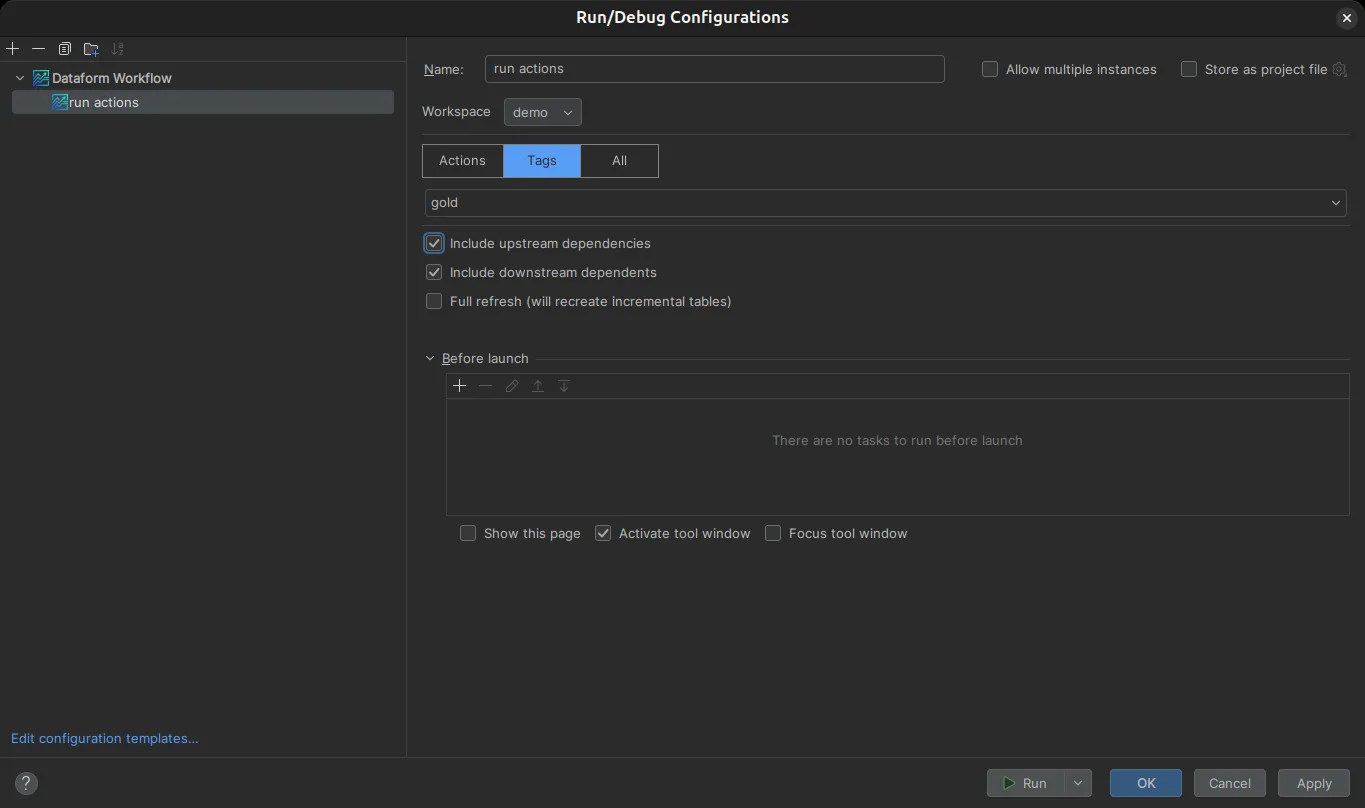
| Option | Description |
|---|---|
| Workspace | The Dataform workspace to run. |
| Actions / Tags / All | Run the selected actions, the actions carrying the selected tags, or the whole project. |
| Include upstream dependencies | Also run the actions the selection depends on. |
| Include downstream dependents | Also run the actions that depend on the selection. |
| Full refresh | Recreate incremental tables instead of updating them. |
Execution view
While the workflow runs, the execution view shows the progress of each action, with its status, timings and failure reason. For each executed action it also shows the BigQuery job: job id, bytes processed and billed, duration and the queries of child jobs.
Runs use the service account of the active repository when one is set; see Configuration.