RBENREJEB@RBR-OS:/OPT/DATAFORM-INTELLIJ-PLUGIN/FEATURES/COMPILED-PREVIEW$ CAT README
Compiled preview
Dataform Plugin for IntelliJ · Features
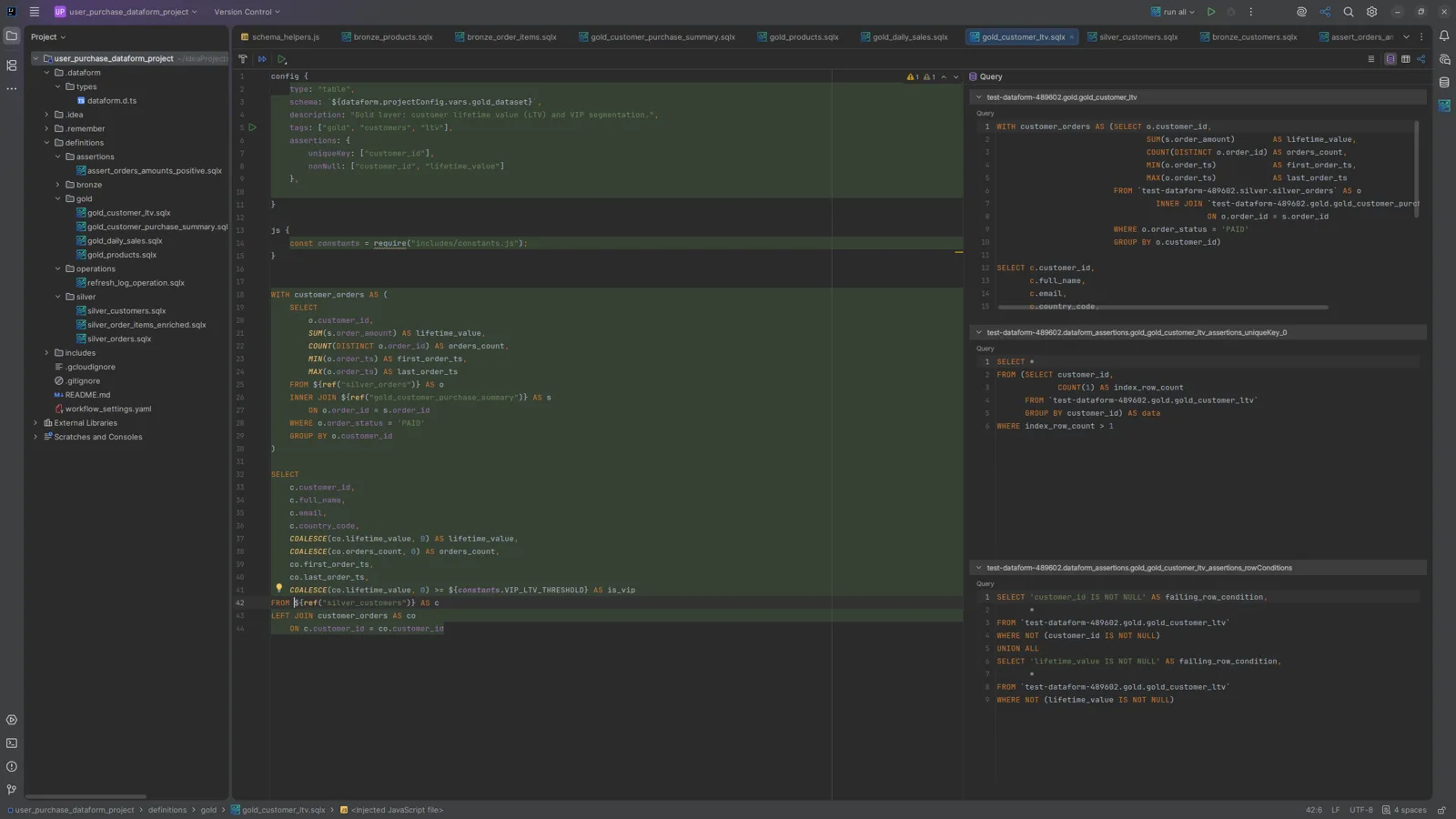
Each SQLX file opens in a split editor: your source on the left, and a preview of what Dataform compiles it to on the right. The preview follows the background compilation, so it stays in sync as you edit.
Views
The toolbar at the top right of the editor switches the preview between three views:
| View | Content |
|---|---|
| Query | The compiled SQL, split into pre-operations, incremental pre-operations, the query, post-operations and compilation errors, followed by the queries of the action’s assertions. |
| Schema | The resolved output schema of the action. |
| Lineage | The direct dependencies of the file. See Lineage. |
In the screenshot above, the Query view shows the compiled query of gold_customer_ltv, with
${ref()} replaced by full table names, then the uniqueKey and rowConditions assertions generated
from its config { } block.
Running from the preview
The Execute Query button of the toolbar runs the compiled query in BigQuery. See Query execution.
Schemas are resolved through BigQuery dry runs, so the Schema view needs the Google Cloud sign-in and an active repository (see Configuration).